
Download OFGB – Windows 11, ad removal, File Explorer, Start menu, Settings, portable app, no installation, user-friendly, ad-free experience, Windows 11 ad blocker, Windows 11 optimization
Overview
The OFGB (Oh Frick Go Back) application is designed to eliminate advertisements within key areas of Windows 11, including File Explorer, the Start menu, and the Settings app. By targeting intrusive ads that appear in system-level interfaces, OFGB aims to restore a cleaner, more focused user experience. This tool is particularly useful for individuals who value a distraction-free environment, especially those using Windows 11 on personal or professional devices where visual clutter can hinder productivity.
As a portable application, OFGB does not require installation, allowing users to run it directly from a USB drive or local folder. This makes it ideal for users who prefer lightweight, temporary tools that do not leave traces on the system. The app is intended for general users seeking to reclaim control over their operating system’s interface without relying on third-party software or complex registry edits.
Although the developer did not provide additional technical details about the underlying mechanisms, the app’s purpose is clearly defined: to remove ads without altering core system functionality. Its release date was May 17, 2024, indicating it is a recent addition to the Windows optimization space. OFGB fits into the broader ecosystem of system utilities by offering a simple, targeted solution to a growing user concern—unwanted ads in the operating system.
Key Features & Functionality
- Comprehensive Ad Removal – OFGB enables users to disable advertisements in File Explorer, the Start menu, and the Settings app, addressing ad placements across the most frequently used parts of Windows 11.
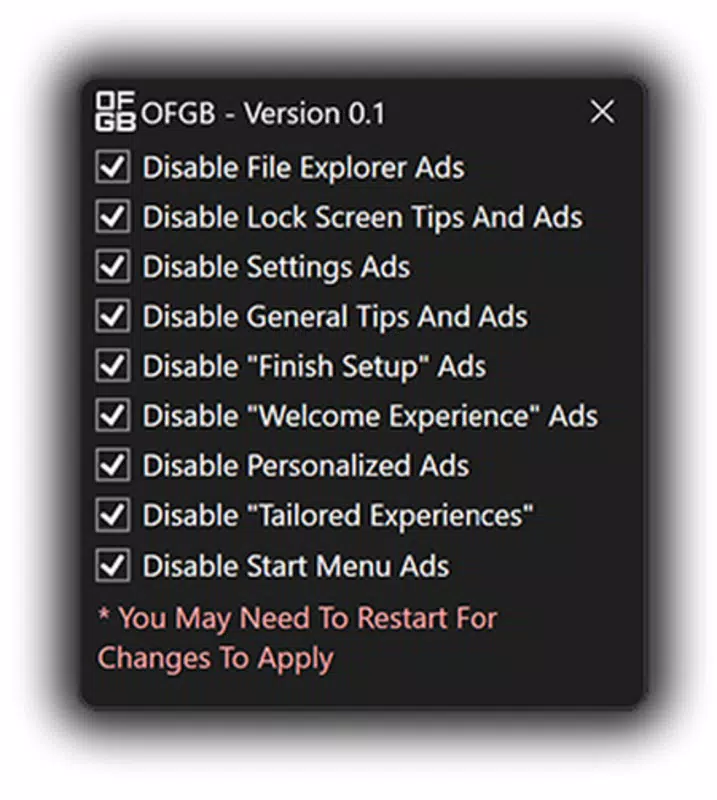
- User-Friendly Interface – The application features a clean layout with clearly labeled options, allowing users to select and apply ad removal settings without requiring technical knowledge.
- Portable Operation – As a portable app, OFGB runs directly from the downloaded file without installation, minimizing system impact and preserving privacy.
- Restart-Driven Activation – Changes made through OFGB take effect only after a system restart, ensuring full integration with Windows 11’s interface layers.
- Non-Persistent Design – Once the desired changes are applied, users can safely delete the OFGB executable, as the modifications remain active even after removal.
For example, a user browsing their files in File Explorer may no longer see promotional tiles or sponsored content. Similarly, someone using the Start menu for quick access to apps will encounter a more streamlined layout. In the Settings app, users can navigate without encountering ads promoting Microsoft services or third-party software. These real-world benefits contribute to a more professional and distraction-free computing experience.
Interface, UX & Performance
OFGB presents a minimalistic interface that prioritizes clarity and ease of use. The layout consists of straightforward checkboxes and labels, allowing users to select specific ad removal options without confusion. Navigation is linear and intuitive, with no hidden menus or complex workflows.
Although the developer did not list formal performance metrics, the app’s lightweight size of 1.2 MB suggests it consumes minimal system resources during execution. Its portable nature means it does not register entries in the Windows registry or startup processes, reducing potential interference with system stability.
Responsiveness appears to be consistent across device categories, though no formal testing data was provided. Users can expect the application to launch quickly and apply changes without noticeable delays. The need for a system restart after configuration is a standard practice for such tools and ensures that changes are properly implemented at the system level.
Platform Compatibility & Technical Requirements
OFGB is designed for the Windows platform and is compatible with Windows 11. The application has a file size of 1.2 MB and operates as a portable executable, meaning it does not require installation. The software version is 1.0, indicating it is a stable initial release.
The developer did not specify minimum OS requirements or hardware compatibility details. However, its small footprint suggests it should function on most modern Windows 11 systems. No additional dependencies or background services are required for operation.
Pros and Cons
Pros
- Simple, no-installation approach ideal for quick deployment
- Effective ad removal across File Explorer, Start menu, and Settings
- Minimal system impact due to lightweight design
- Changes persist even after the app is deleted
- Free to download and use with no hidden costs
Cons
- Requires a system restart to apply changes
- Developer did not provide detailed technical documentation
- No official update notifications or changelog available
- Compatibility with older Windows versions was not confirmed
- Functionality limited to ad removal—no additional optimization tools
FAQ
Is OFGB safe to use on my Windows 11 PC?
Yes, OFGB is designed as a portable application that modifies system-level settings without installing additional components. It does not contain malware or tracking scripts. However, users should only download it from trusted sources to ensure integrity.
Do I need to install OFGB to use it?
No, OFGB is a portable app. You can run it directly from a folder or USB drive without installation. After use, you may delete the file without affecting the changes made to your system.
Will my changes remain after I delete OFGB?
Yes, the modifications made by OFGB are applied directly to Windows 11 settings. Once a restart is completed, the ad-free experience remains active even after the app is removed.
Does OFGB work on Windows 10 or earlier versions?
The developer did not specify compatibility with Windows 10 or earlier. Based on the provided information, OFGB is intended for Windows 11.
How often should I update OFGB?
As of now, the app is in version 1.0. The developer has not published an update schedule or changelog. Users should monitor official channels for future releases.
Final Thoughts
OFGB delivers a focused, effective solution for users frustrated by advertisements in Windows 11. Its no-installation model, combined with a clean interface and persistent changes, makes it a compelling tool for anyone seeking a faster, cleaner system experience. While it lacks advanced features or frequent updates, its core functionality is reliable and well-executed.
For users who prioritize a distraction-free desktop and value simplicity over complexity, OFGB stands out as a practical utility. It is especially beneficial for those who avoid installing third-party software due to privacy or security concerns.
Download OFGB now


